


Table of Contents Show
For those who don’t know the tool: Autograph is Maxon’s motion-graphics and compositing application with an integrated 3D workspace. Version 2027.0 adds an MCP server for agent-assisted workflows and a direct bridge to Cinema 4D.
Autograph 2027.0 brings a built-in Model Context Protocol server, direct transfer of compatible Cinema 4D scene elements, a dockable Maxon Studio panel and a more capable typography workflow. That combination deserves a closer look than “the compositor has acquired a chatbot”. It connects scene assembly, animation, layout and finishing in ways that could make motion designers reconsider where the comp begins. The camera, apparently, would also like to stop being rebuilt from memory.
For the wider release, start with our Maxon 2027.0 overview, “More Trees, Fewer Detours”, published on 14 October. This article takes the longer route through Autograph: what the new controls actually do, what survives the trip from Cinema 4D and why a seemingly modest collection of interoperability and text improvements may matter to the daily business of motion graphics.
A compositor with more than finishing in mind
As our earlier Autograph 2026 coverage explained, the application combines a layer-based timeline with an integrated 3D workspace. Its current product documentation describes an OpenUSD-based 3D environment, compositions used as textures, SVG and layered Photoshop imports, multi-channel EXR support, and ACES and OCIO workflows. Those are the foundations beneath this release, rather than a collection of newly invented 2027 features.
That foundation gives the update its context. A motion-graphics job often contains dimensional objects, rendered footage, live type and layouts that must survive several frame shapes. Autograph already offers responsive compositions based on relative definitions, allowing one composition to serve multiple formats.
The 2027 changes bring more of the surrounding work into that environment: transferring scene elements, constructing layouts through an assistant and keeping typography editable. The interesting question is how much assembly can stay connected before the familiar “final_final_vertical” family starts breeding.
MCP: giving the assistant access to the tools
The optional built-in MCP server exposes Autograph’s own tools to compatible AI assistants. Maxon names Claude and ChatGPT as examples and describes agents constructing compositions, using native interpolators such as Bounce and Elastic, and building responsive layouts. Enabling MCP in Cinema 4D as well allows an assistant to work with both applications in a shared workflow. These are documented use cases, rather than evidence that every client configuration or every conceivable operation is supported.
The distinction is practical. An assistant operating native composition tools can help assemble something an artist continues to edit in the application. A title built with text, layout relationships and native animation controls remains a project to refine. A rendered suggestion is a different kind of deliverable. Here, the promise is to move some of the repetitive construction work into a conversation while retaining the application as the place where the result is inspected and developed.

Bounce and Elastic are a useful illustration because motion design depends on the character of a move, not merely on an object arriving somewhere. Having an agent use the application’s existing interpolators keeps that work within familiar animation constructs. The artist still decides whether the overshoot is charming, indecisive or reminiscent of a logo trying to escape the meeting. Natural-language access does not make those judgements disappear.
Responsive layouts are an equally plausible area for assistance. The useful request is less “make it beautiful” than a concrete instruction about the intended structure, alignment and behaviour when the frame changes. Maxon documents responsive-layout construction; it does not promise that an assistant automatically understands a channel’s graphics bible. Treat the agent as another way to operate the project, with an explicit brief and visible review points. The creative decision remains a decision, even when fewer clicks stand between it and the timeline.
Two applications, one conversation, several boundaries
The cross-application prospect is especially interesting for Cinema 4D users. Maxon built an assistant controlling Autograph and Cinema 4D together. That could make sequences of tasks across scene preparation and compositing easier to coordinate, provided the required operations are exposed by each application. It is an opportunity for connected workflows, not a claim that either program becomes a complete substitute for the other.

There are two separate mechanisms here. MCP gives an assistant a route to operate application tools; the new copy-and-paste feature transfers supported scene elements. Neither description establishes a persistent live link that keeps two projects synchronised after every edit. Studios evaluating the combination should keep that distinction in view: issuing commands to two applications and maintaining a bidirectional scene relationship solve different problems. “They are talking” is encouraging. It is not yet a pipeline specification.
Cinema 4D copy and paste: what actually travels
The Cinema 4D 2027.0 release notes provide the most precise description of the transfer. Cameras, lights, primitives, planes, text and nulls can be copied into Autograph, together with position, rotation and scale animation. Both standard and Redshift cameras and lights are supported. Static values are exported as constants, and MoText and text splines become native, editable Autograph text layers.

Animation is baked per frame. That matters for movement driven by expressions, MoGraph, constraints or rigs: the documented result follows the viewport playback rather than requiring those driving systems to exist inside Autograph. The destination receives the evaluated movement. It does not receive a promise that the original expression, constraint network or rig remains procedurally editable there. If the source motion changes, plan for another transfer rather than assuming the baked result knows about it.
Unsupported objects fall back to nulls. That is a useful, very specific boundary to the interoperability claim. A transferred scene reference is not automatically renderable geometry, and “compatible primitives” should not quietly expand into “every Cinema 4D object”. Likewise, the transfer description does not establish complete migration of materials, simulations or a production scene’s entire dependency tree. The supported subset is already valuable without awarding the clipboard a doctorate in scene translation.
For a practical motion-graphics setup, consider a rendered 3D shot that needs editable text and additional elements placed in the same camera space. Moving the camera and supported reference objects provides a more direct starting point than recreating the scene by eye. Transferring text as native layers also leaves room for copy changes inside the comp. That is a workflow implication of the documented transfer, not a measured claim about how many minutes it saves on every job. The improvement is in what can cross the boundary intact.
A Redshift workflow does not mean a Redshift renderer
Maxon positions the bridge as a way to combine Redshift renders with Autograph’s 3D workspace. There is an important rendering distinction: Autograph itself continues to use Filament, which Maxon describes as a real-time physically based renderer. The current product FAQ explicitly answers the Redshift question that way. Copying a Redshift camera or light into Autograph therefore does not turn the destination into Redshift or guarantee identical shading and lighting results.
The useful division is between the rendered image and the compatible scene information that helps finish it. A Redshift image can supply the rendered look while the receiving composition uses transferred elements for its own assembly. Camera alignment, editable overlays and additional dimensional graphics can then be considered together. Colour management and the appearance of receiving-side 3D elements still need deliberate choices; a shared corporate logo on the splash screens is not a colour pipeline.
Typography that survives the handoff
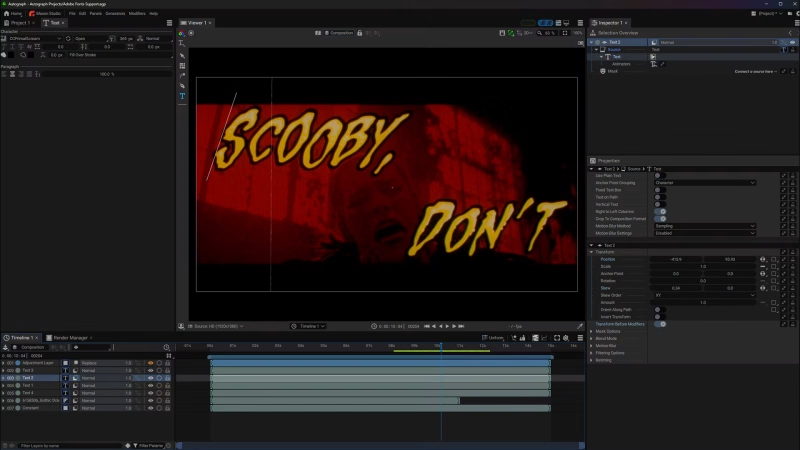
Adobe Fonts installed through the Creative Cloud desktop application are now available in Autograph’s Text Panel. Windows font discovery also improves. The documented integration concerns installed fonts; it should not be read as an independent font subscription bundled with Autograph. For teams working with established brand typography, access through the normal text controls is the relevant benefit.

The Text Generator now synchronises content between Rich Text and Plain Text modes. Converting from Rich to Plain preserves the text but applies the first character’s styling across the block. Moving from Plain to Rich preserves the shared character attributes. That makes mode changes less destructive to the copy itself, although mixed formatting is necessarily flattened on the way to plain text. A name survives the trip; its carefully differentiated styling may need attention.
The distinction matters when developing templates as well as when polishing a single title. Designers can change the text representation without retyping the content, while knowing which formatting rule governs the conversion. Combined with native text arriving from Cinema 4D, this gives typography a better chance of remaining editable through the assembly process. The inevitable late spelling correction may still arrive, but at least it need not demand an archaeological expedition into an earlier render.
Vertical text is a layout system, not a rotation
The Japanese typography changes go beyond turning a text layer sideways. Tate-Chuu-Yoko supports horizontal numerals within vertical text, with automatic column spacing. The release also adds column-aware mouse and keyboard cursor navigation, Text Box support with automatic column-flow conversion, left-to-right and right-to-left column-flow switches, and improved character alignment. Maxon’s feature overview also identifies Tsumegumi kerning improvements.

Those details address how text is edited and flows, not merely how it looks in a still frame. Numerals inside a vertical run need to occupy their space sensibly; the cursor needs to follow the structure the designer is actually editing; columns need an explicit direction. For multilingual graphics, that is more consequential than another ornamental text preset. A composition can be visually adventurous while still respecting the writing system it has been asked to carry.
Repeating graphics, fewer floating windows
The Tile Modifier gains distribution and orientation options for repeating a source image. Extension can be restricted to a horizontal or vertical axis to create an infinite strip from a seamless source, or controlled with discrete copy counts. Those are useful distinctions for graphic bands, patterned backgrounds and other repeated elements: a strip and a bounded array serve different layout purposes. The source still needs to suit the intended repetition; the modifier is not a seam-removal service.

Maxon Studio becomes a native dockable panel, bringing access to Red Giant tools and plugin presets into the workspace. Earlier Autograph releases already had Studio integration, so the 2027 change is the dockable presentation rather than the invention of that relationship. On a crowded screen, however, keeping the controls in a stable layout is a worthwhile improvement. Floating windows have an impressive ability to occupy precisely the pixel you need next.
Broadcast examples and the less glamorous fixes
New demo projects are available from the Welcome Screen, covering news and sports graphics with native 2D/3D work and delivery in 16:9, 4:3 and vertical 9:16. They provide concrete material for studying how projects are assembled across formats. Their inclusion is not a certification of a broadcaster’s delivery specification, but they are a more relevant learning starting point than an attractive scene with no relationship to the day’s deliverables.
The Autograph 2027.0.0 changelog also contains production-facing repairs. These include HEVC playback problems, fonts failing to reassign correctly after saving or reloading, proxy-related scaling and 2D/3D mismatches, and incorrect default camera positions in square or vertical compositions. Vertical-text editing after clearing the cache and masks on adjustment layers were among the crash fixes. These are fixes for specified problems, not a blanket compatibility guarantee.

Other corrections concern animation and procedural construction: deleting a spatial keyframe with Broken interpolation now preserves the tangent; Follow Path’s Repeat mode is repaired for negative values; Multi-Edit works on Generator parameters; and Time Offset no longer loses its effect when Follow Time is enabled. A List Directory generator linked through Bind to Table to composition duration also receives a fix. Such entries rarely dominate a launch presentation, but they live closer to the sort of project behaviour that makes an artist trust a template.
Is the motion-graphics comp starting to move?
Our reading of this release is that the boundary around motion-graphics compositing is becoming more negotiable. Autograph brings layout, native type, dimensional assembly and effects into the same working environment, then adds more direct scene transfer and a conversational route to its tools. For a Cinema 4D-centred workflow, that creates a credible reason to investigate where finishing and design should meet, rather than automatically treating the compositor as the last stop after everything interesting has happened.
That does not establish that existing workflows are about to be replaced. It suggests a more useful experiment: take a representative graphics package, preserve the real delivery requirements and see which parts remain easier to revise when they stay native and connected. If the combination works for the job, the shift may arrive through a series of small decisions about cameras, text and versions. Industry change occasionally wears a keynote jacket. Quite often it just stops making you rebuild the same thing twice.
Availability and a sensible first production test
Autograph 2027.0.0 was released on 14 October 2026 and is available for Windows and macOS. The application is free; Maxon’s current product page specifies that access to Universe plugins and Red Giant OFX tools requires a licence. The dockable Studio panel does not remove those entitlements. The official release overview and detailed technical notes cover the update.
Before moving a show, test a copy of a representative project with its actual fonts, footage, frame shapes and transferred animation. Check what the enabled Autograph MCP connection exposes and review the assistant’s changes; the release pages do not supply a complete permission or security specification, and Cinema 4D’s separate MCP controls should not be assumed to describe Autograph. For the scene bridge, inspect baked motion, unsupported objects and the appearance of receiving-side 3D elements. The aim is a more flexible comp workflow with fewer repeated chores. Artistic judgement remains stubbornly absent from the clipboard.
| Product | Maxon Autograph |
| Developer | Maxon |
| Version | 2027.0.0 |
| Release | 14 October 2026 |
| Application | Free; commercial connected effects may require entitlement |
| Official notes | Technical changelog |
Topics
 Adobe After Effects344 postsA busy playground for layers, keyframes and the occasional expression. Explore After Effects news, techniques and motion-design workflows for turning graphic ideas into animation and assembled elements into finished shots.
 Maxon Cinema 4D505 postsMake room for shapes with a sense of rhythm. Explore Cinema 4D modelling, animation and motion-design workflows, alongside tools and updates for bringing graphic ideas into three-dimensional production.
Article details
- Published
- Author
- Bela Beier
- Reading time
- About 12 min
- Word count
- 2,296