



For those who don’t know the tool: Quick Finger Collision is a Blender add-on on Superhive by Zemalate, alongside Quick Vertex Groups and Quick Shape Keys for rigging, vertex-group, and shape-key chores.
Hands, meet mesh
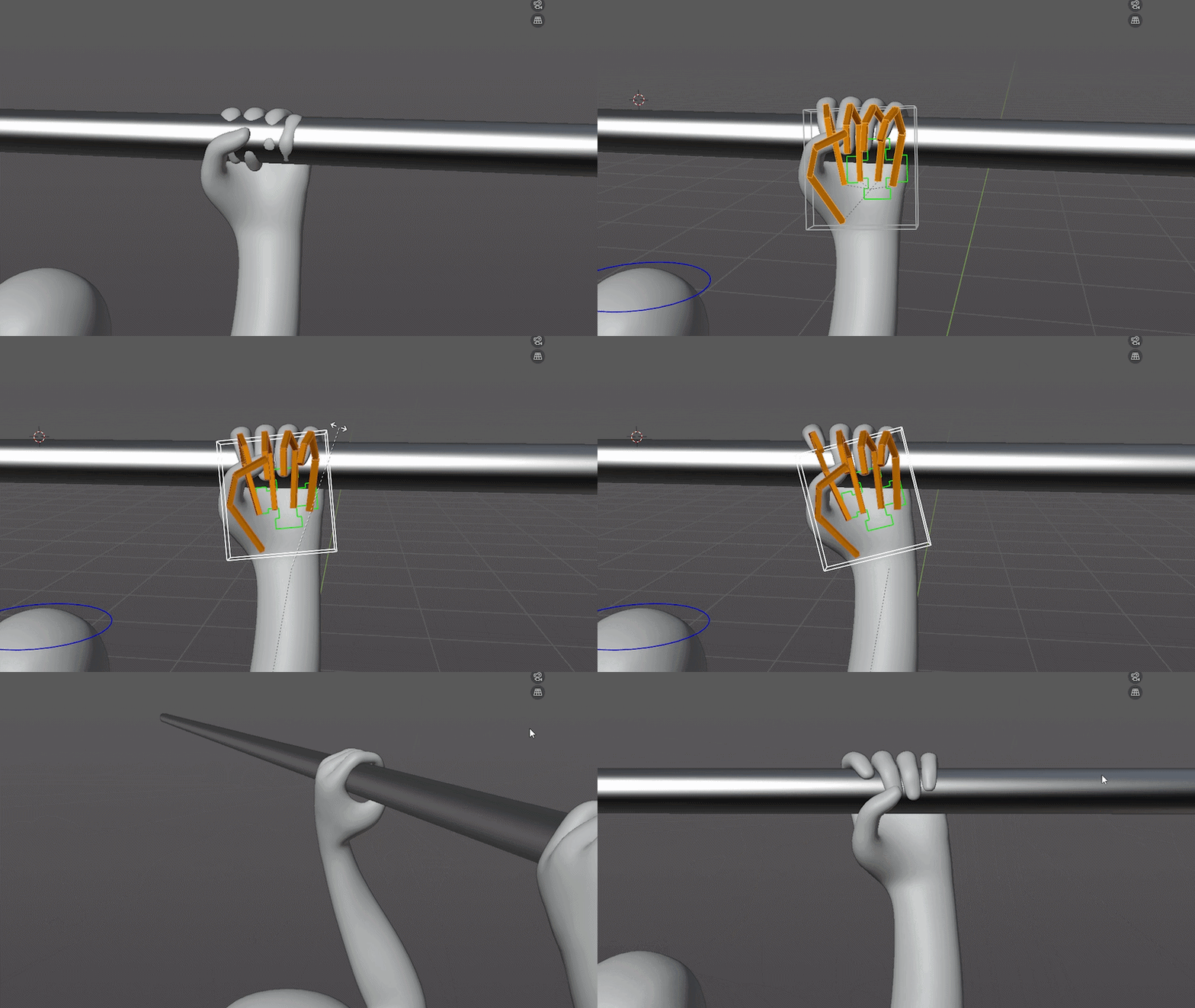
“Quick Finger Collision” targets one very specific production nuisance: posing fingers around objects without having them slide straight through the mesh like tiny cursed ghosts. The add-on adds collision-aware behaviour to finger bones. It is designed for hand posing with clean contact with objects. Finger bones stop on mesh contact, preventing fingers from passing through objects, and the tool helps fingers wrap around props quickly.
That is the pitch, and it is refreshingly small. No cosmic rigging platform. No promise to replace animators. Just hand posing, mesh contact, and fewer finger intersections when a character grabs a prop. For animation teams, that makes the tool sit in the cleanup zone between rough posing and final polish. It does not remove the need for taste, silhouette checks, or shot context. It aims at the tedious bit where fingers need to meet an object without clipping.
The buttons you’ll touch
The plugin has two features: Collision and Grab. Collision handles finger-bone contact behaviour. Grab handles for object grabbing. The interface is described as a single panel where artists can select finger bones, run collision, and grab objects.
That small interface footprint matters for a Blender tools workflow. Hand posing already lives among armatures, constraints, custom shapes, IK controls, mesh visibility, viewport overlays and whatever rig naming scheme escaped from the last project. A single panel is the correct number of panels for a utility like this.
Compatibility and render engines
Quick Finger Collision supports Blender versions 4.0 through 5.1. Superhive lists the render engines used as Cycles and Eevee. That listing should not be overread—the add-on targets posing, not rendering. The render engine field appears on the marketplace product page, but its functionality pertains to finger bones, mesh contact, Collision, and Grab. But oh well, a bit more Metadata never hurt anybody.
License, price, sales
The tiny caveat shelf
The add-on looks focused, which is good. Focused tools often survive real production better than giant panels trying to solve seven departments before lunch.
Still, hand contact can be a messy little rigging swamp. Mesh shape, finger bone placement, skinning, constraints, control hierarchy and pose order can all affect results. None of those conditions is documented – the tool may be useful, but it deserves a proper shakedown on production rigs, duplicated files and nasty edge cases.
But it is also cheap enough to be an impulse buy, at $7.99, even though pipeline sanity is not priced by impulse. Check it on the rig, check the pose result, check editability after use, and check whether it helps animators rather than just hiding another cleanup task three clicks later.
Topics
 Modeling462 postsStart with a point, end with a world. Follow modelling tools and techniques for building characters, props and environments, with an eye on shapes that will survive the production pipeline.
 Simulation244 postsLet the carefully controlled chaos begin. Explore fluids, smoke, fire, cloth and destruction, including the tools and decisions that turn experiments into effects worth putting on screen.
 Blender699 postsA whole creative workshop behind one orange mark. Explore Blender news and techniques across modelling, animation, effects and rendering, with workflows for taking an idea from an empty scene to a finished image.
Article details
- Published
- Author
- Bela Beier
- Reading time
- About 3 min
- Word count
- 478